I’ve been diving into Server-Sent Events (SSE) lately, trying to understand how it works, where it fits, and what its tradeoffs are. It’s an interesting protocol, especially compared to WebSockets and traditional HTTP streaming.
Skip to the scaling section if you’re here only for that.
This post is part of a series on my real-time leaderboard project
- Introduction to Server Sent Events(SSE) ( ← you are here)
- Optimizing Docker Image builds
- Scaling SSE to 150k connections
- Backpressure in Distributed Systems
- Fixing fanout, and other issues
- Replacing Redis sorted sets (coming soon)
- Reproducible Grafana setup (coming soon)
- TCP stack tuning (coming soon)
What is SSE?
Unlike the full-duplex (two-way) communication channel of WebSockets, SSE offers a simpler, lightweight alternative built directly on HTTP. It’s designed for scenarios where a server needs to push data to a client, without needing to receive messages back. This makes it highly efficient for real-time updates like live news feeds or notifications.
How SSE Works
The Protocol Flow
- The client sends a GET request with the header
Accept: text/event-stream. - The server responds with
Content-Type: text/event-streamand keeps the connection open. - The response is sent in chunks (using
Transfer-Encoding: chunked), each containing an event. - The underlying TCP connection ensures reliable delivery, but this also means each packet must be acknowledged, unlike UDP-based solutions where you trade reliability for speed.
- The client can automatically reconnect if the connection is lost by using the retry field sent by the server.
The Event Stream Format
The data sent from the server is a plain text stream with a specific format. Each message is separated by a pair of newlines. The format supports several fields:
: this is a comment and will be ignored
retry: 10000
id: event-123
event: leaderboard_update
data: {"user": "pranshu", "score": 9001}id: Allows the browser to track the last received event. If the connection drops, the browser will automatically reconnect and send aLast-Event-IDheader, so the server can resume the stream.data: The payload of the message. You can have multipledatalines for a single event.event: A custom name for the event. The client can listen for specific event types. If omitted, it defaults to a ‘message’ event.retry: Tells the client how long to wait (in milliseconds) before attempting to reconnect if the connection is lost.
Client Side Implementation: The EventSource API
On the client-side, browsers provide the native EventSource API, which handles all the complexity of connection management and parsing for you.
var es = new EventSource("localhost:8000/stream")Server Side Implementation (Go)
import (
  "fmt"
  "net/http"
  "time"
)

func sseHandler(w http.ResponseWriter, r *http.Request) {
    w.Header().Set("Content-Type", "text/event-stream")
    w.Header().Set("Cache-Control", "no-cache")
    w.Header().Set("Connection", "keep-alive")

    // CORS headers may be needed if you're using a browser to test

    clientGone := r.Context().Done()

    rc := http.NewResponseController(w)
    t := time.NewTicker(2*time.Second)
    defer t.Stop()
    for {
        select {
        case <-clientGone:
            fmt.Println("Client disconnected")
            return
        case <-t.C:
            _, err := fmt.Fprintf(w, "data: The time is %s\n\n", time.Now().Format(time.UnixDate))
            if err != nil {
                return
            }
            err = rc.Flush()
            if err != nil {
                return
            }
        }
    }
}

func main(){
  http.HandleFunc("/stream", sseHandler)
  err:=http.ListenAndServe(":8080", nil)
  fmt.Println("Started SSE Server")
  if err!=nil{
    fmt.Println(err.Error())
  }
}
Scaling
Vertical scaling is trivial in SSE and does not require a discussion. The problem is in horizontal scaling, where like websockets the state handling creates issues. Thankfully a lot of this is easier for SSE due to the browser native support.
Thinking about state
SSE can be used in a stateless or a stateful manner.
Stateless SSE streams will never know at which point they left off, what data do they need to reread. This method is to be used when the data being sent is a whole snapshot of the state, so the latest message is the most important, previous messages can be discarded, and the client does not rely on the preceding messages or even the order they came in to get things done. My leaderboard is this kind of application and therefore does not need to think about the state, it just sends the latest snapshot of the state of the db.
Stateful use cases require reading of the whole event stream from the last known point in the order the messages came in. This way is used in applications like notifications, chat, where order matters, and all messages matter, they are not usually consolidated into a single thing. If a client closes a connection, deliberately or otherwise, upon reconnection it should be able to read all the messages that have been generated from the time it dropped the connection to when it rejoined.
How do you handle reconnections?
SSE has a very neat way of solving the stateful reconnect problem, it uses an event-id field inside the message that it sends to the client, the client’s browser keeps track of the last event id it received. When the connection is dropped and the user rejoins, the browser supplies the last known event id to the server which then replays all messages since that event id. This is quite like the offset storage in kafka.
This method does not take into consideration the non browser use cases, but it’s pretty simple, you’d just have to implement that part if you’re a client (or make use of the EventSource API if in JS).
It’s a simple and elegant solution to an otherwise annoying problem, such as the one websockets have.
Scaling and Proxying SSE
SSE works with HTTP 1.1 onwards (ChatGPT and Claude use it over HTTP ), but there are some considerations when scaling it (more on that later). Since it’s built on top of HTTP, it behaves like any other HTTP request-response cycle but keeps the connection open, allowing the server to send data whenever it wants.
Proxying SSE can be a bit tricky. Since the connection is persistent, Layer 7 proxies (like Nginx) need to be properly configured to support long-lived connections. While it’s simpler than WebSockets, some proxies may still close the connection prematurely.
Note: Another concern is the six-connection limit in HTTP 1.1 — this limit applies per domain in a browser. This means if a user opens many tabs making SSE connections to the same server, they may hit this limit, preventing subsequent connections from that browser from being established until an existing one is closed. However, HTTP/2 mitigates this with multiplexing, allowing multiple streams over a single connection.
Observability & Performance
If I scale SSE servers, I’d want to measure:
- Connection handling (how many concurrent clients?)
- Latency (how fast are events being pushed?)
- Resource usage (CPU, memory overhead per connection)
Key considerations for SSE
- Will the six-connection limit in HTTP 1.1 affect SSE scaling?
Yes, but only for browser clients, HTTP/2 helps mitigate this.
- How is SSE different from HTTP streaming apart from the headers?
SSE is a standardized protocol with event formatting, automatic reconnection, and an event ID mechanism.
- How truly stateless is SSE?
Stateless by design, but client state tracking may be used to resume a stateful stream on reconnection.
- How do I detect client disconnections and clean up resources efficiently?
Use TCP connection close detection or periodic heartbeats.
- Why is timeout used in SSE?
To detect stalled connections and trigger reconnections. Heartbeats are another popular way of doing things and you should definitely use that most of the time.
When to use SSE (and when not to)
| Feature | Server-Sent Events (SSE) | WebSockets |
|---|---|---|
| Direction | Unidirectional (Server -> Client) | Bidirectional (Two-way) |
| Transport | Standard HTTP/S | Upgraded from HTTP |
| Protocol | Simple text-based | More complex binary/text protocol |
| Reconnects | Built-in, automatic | Must be implemented manually |
| Use Cases | Notifications, news feeds, stock tickers, monitoring dashboards, live score updates for spectators. | Chat apps, collaborative document editing, real-time multiplayer games (for player actions). |
Theory is great, but to truly understand the performance characteristics and limitations of SSE, I decided to put it to the test. My goal was to build a simple real-time leaderboard and see how many concurrent connections a single Go server could handle.
Key Production Considerations
State management and reconnection
While the SSE protocol itself is stateless, a robust implementation requires thinking about state. When a client reconnects using the Last-Event-ID header, the server needs a way to reconstruct and send the missed events. This could involve querying a database or a cache (like Redis) for messages created after that ID. For true statelessness at the web-server level, this logic can be offloaded to a message broker or cache.
Scaling, Proxies and Connection Limits
Proxying SSE requires careful configuration. Since connections are long-lived, proxies like Nginx must be configured to not buffer the response and not time out the connection prematurely.
Furthermore, browsers limit the number of concurrent HTTP/1.1 connections per domain (typically to six). If a user opens many tabs to your site, they can exhaust this pool. HTTP/2 largely solves this with multiplexing, allowing many streams over a single TCP connection, making it the preferred protocol for scaling SSE.
Security
Since SSE runs over HTTP, you can secure it using standard web security practices:
- Authentication: An SSE endpoint is just a
GETrequest. You can protect it like any other API endpoint. The client can send a session cookie or a JWTAuthorization: Bearer <token>header. The server should validate this before starting the stream. - Transport Security: Always serve SSE over HTTPS (
TLS) to encrypt the data in transit, preventing man-in-the-middle attacks. - Cross-Origin Resource Sharing (CORS): If your client and server are on different domains, you’ll need to configure the correct CORS headers on the server, including
Access-Control-Allow-Origin.
Benchmarking
I tried building a real time leaderboard that streams its state to consumers (broadcasting) through SSE. While the players in a game would need WebSockets to send their moves, a leaderboard that broadcasts updates to all spectators is a perfect, one-way communication scenario for SSE.
The testing setup does not mimic realistic traffic for now. This is intentional, I wanted to test how many connections can be made in a standalone manner before tackling the issue of realistic load.
The testing manner is detailed at this repo.
Find the code for the server at leaderboard.
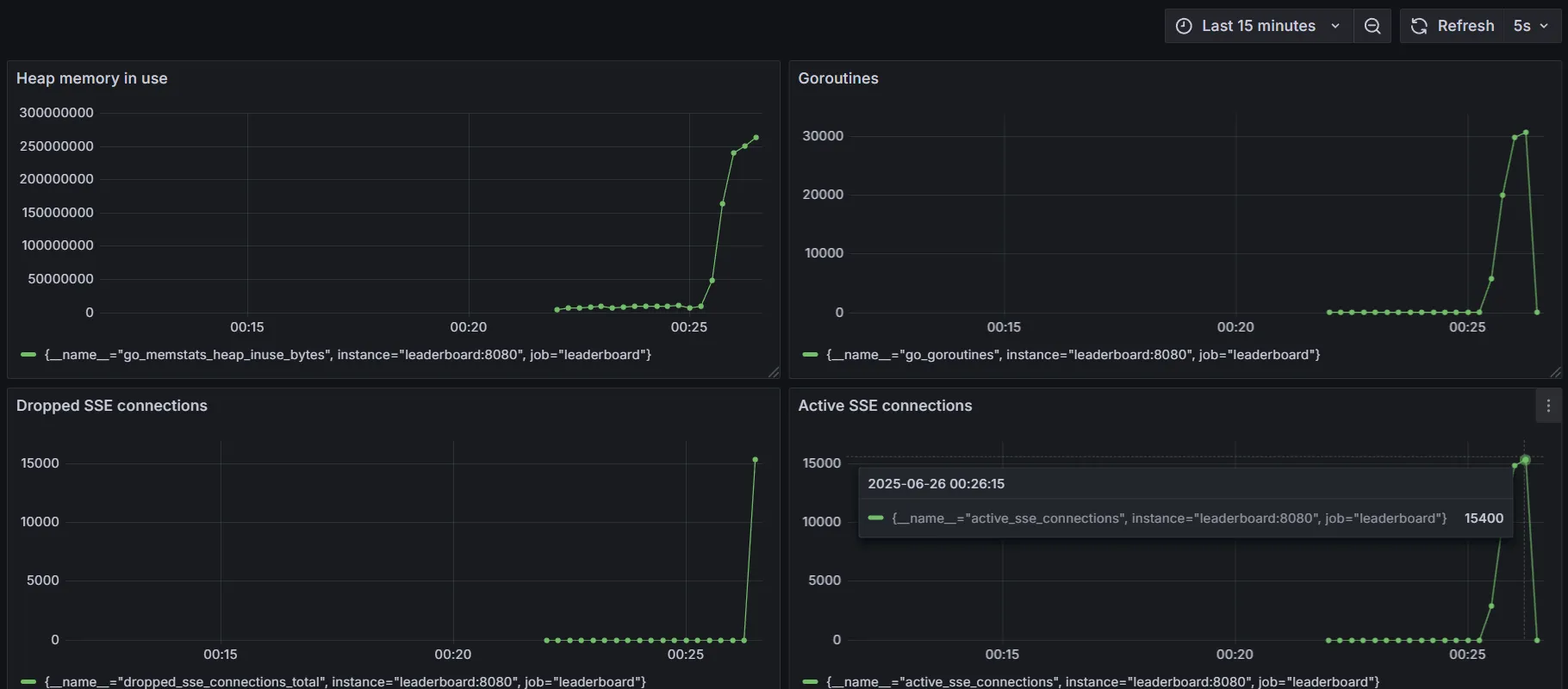
Reaches 15400 (or similar number of connections) before unable to connect due to queue getting full or memory issues. I do not know which, so I’m working on understanding more about it.
Update: The 15400 connection limit was hit while testing on Windows. Since memory, CPU and other system metrics seemed to be fine, I dug deeper into the issue to figure out what exactly was the bottleneck.
Specifically, I was getting this error:
conn 15400 failed: Get "http://127.0.0.1:8080/stream": dial tcp 127.0.0.1:8080: bind: An operation on a socket could not be performed because the system lacked sufficient buffer space or because a queue was full.
A quick google search revealed that this was a common problem on windows systems, often faced in applications like Docker.
The error indicates ephemeral port exhaustion on the client machine running the benchmark. A single client machine can only initiate a certain number of outgoing connections (around 16k on Windows by default) before it runs out of available source ports. This was a limitation of my client, not the Go server itself.
This can be bypassed by forcibly increasing the limit, but I didn’t wanna risk messing with the settings of Windows, which has been a pain to fix sometimes.
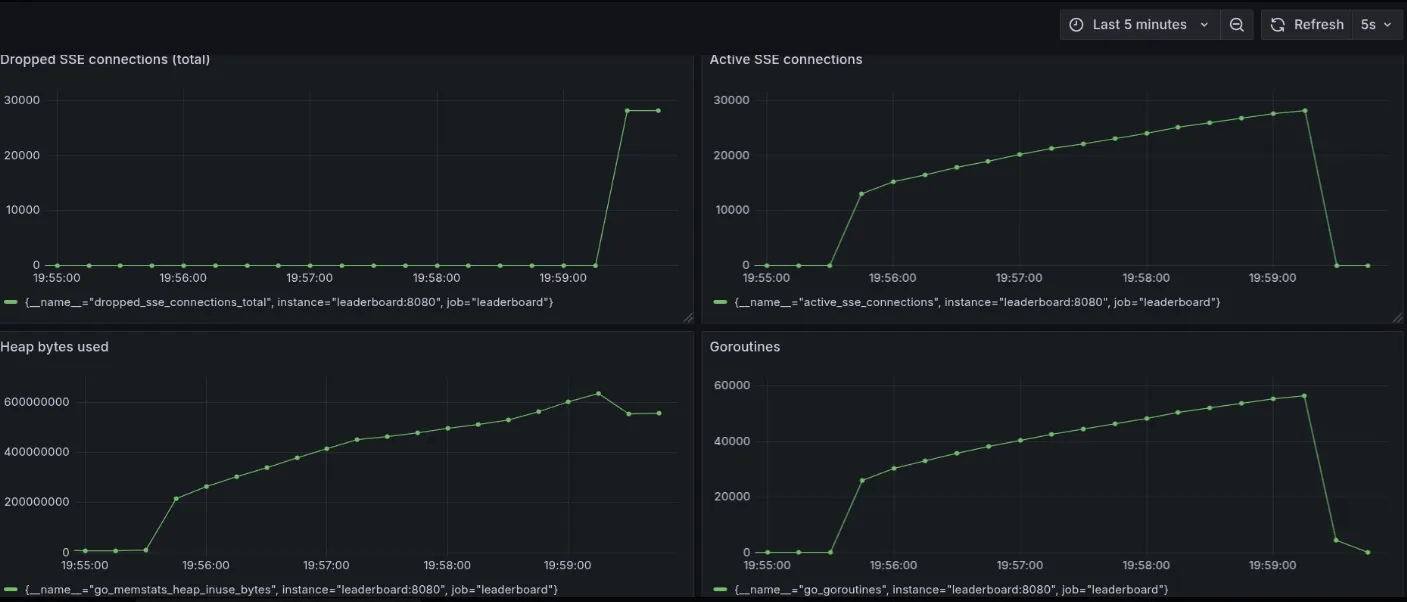
Update: Crossed 28k connections
The 28k limit this time is probably due to limit on number of file descriptors (ulimit) or some other system issue (ports getting exhausted, NAT table limits). Will check and update, but need to optimize memory usage first (growing too fast and not getting deallocated). This is a client issue, not a bottleneck on the server side. To fix this, I believe having multiple distributed clients each making a large number of connections to a server would find the true scaling capabilities of the server.
To do this, a standard way to test would be to host the server on a cloud instance (using docker on a VM of fixed size for standard environments), have multiple client VMs send a lot of requests to it. Since we already have Prometheus and Grafana setup on this server, it’ll be easy to monitor changes as the number of client connections grows.